Product catalog
Simple and assembled products with images, attributes and component relationships.
Laminas · Magento integration · Production planning
A custom Laminas application developed for TNK Motors to manage simple and assembled products, synchronize catalog and orders with Magento, analyse component requirements and manage production operations with estimated fulfilment times.
The production features extend an existing warehouse-management base: they add process definitions, parent/child semi-finished relationships, work-order drafts, supplier confirmation flows, component allocation, WIP handling, scrap tracking and delivery forecasting without separating production planning from the catalog and ecommerce data already managed by the system.

What the system handles
Simple and assembled products with images, attributes and component relationships.
Automatic alignment of catalog and orders between the management application and ecommerce.
Simulations, work orders, supplier handling, component allocation and work in progress.
Estimated delivery times based on lead times, available stock and production choices.
Real interface
These screens come from the working application and show three of the core planning views: assembled-product structure and availability, combined component analysis across selected orders, and the production simulator.
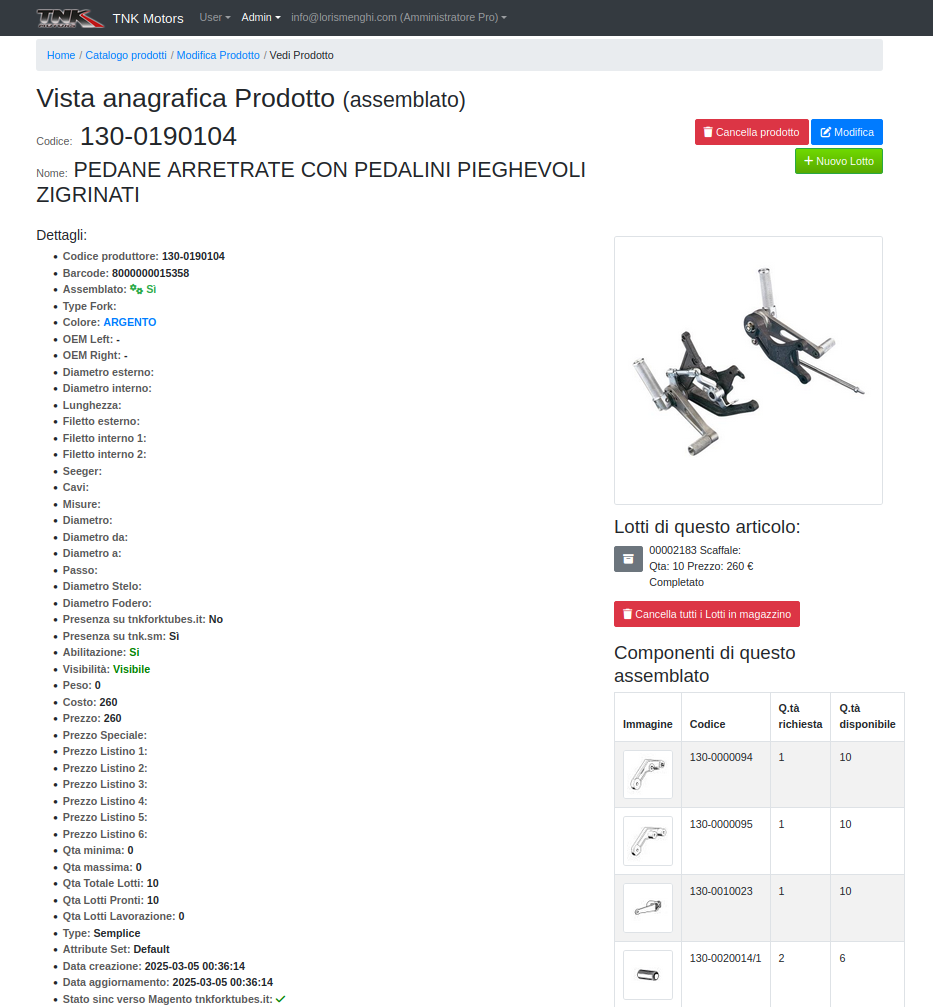
Required components and current availability for an assembled item.
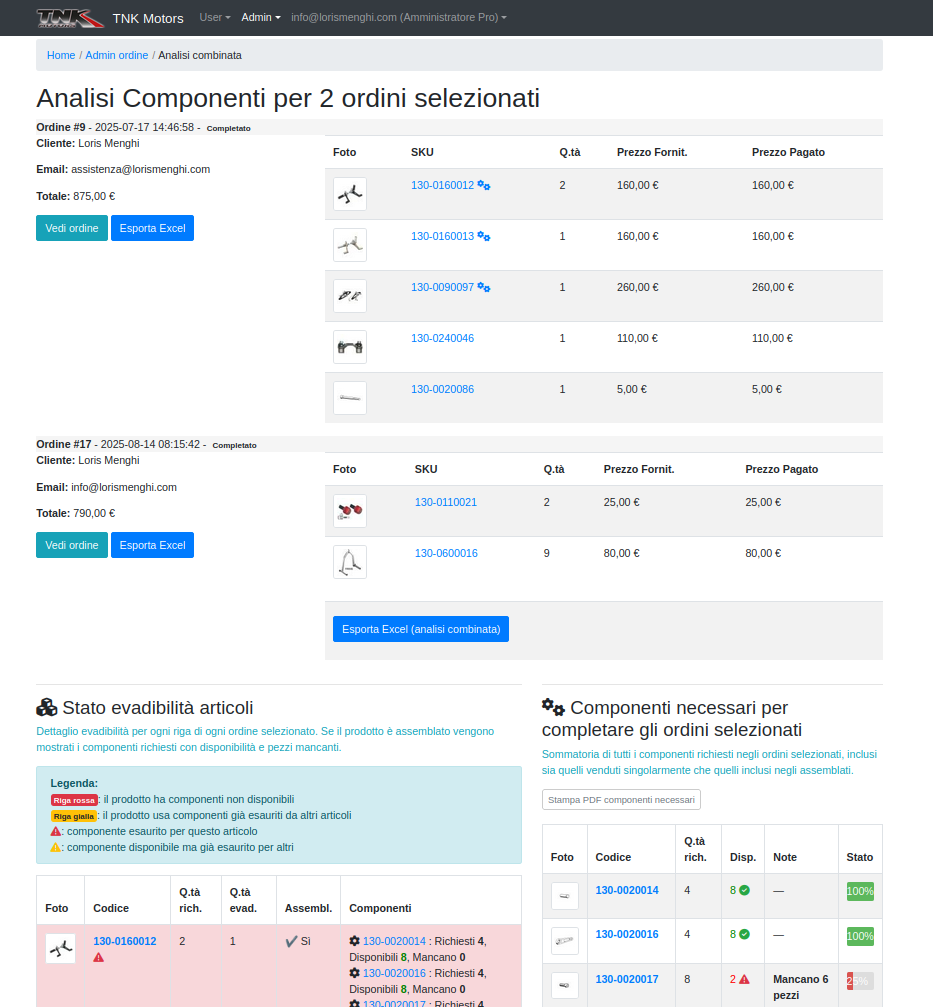
Component requirements aggregated across multiple selected orders, with export support.
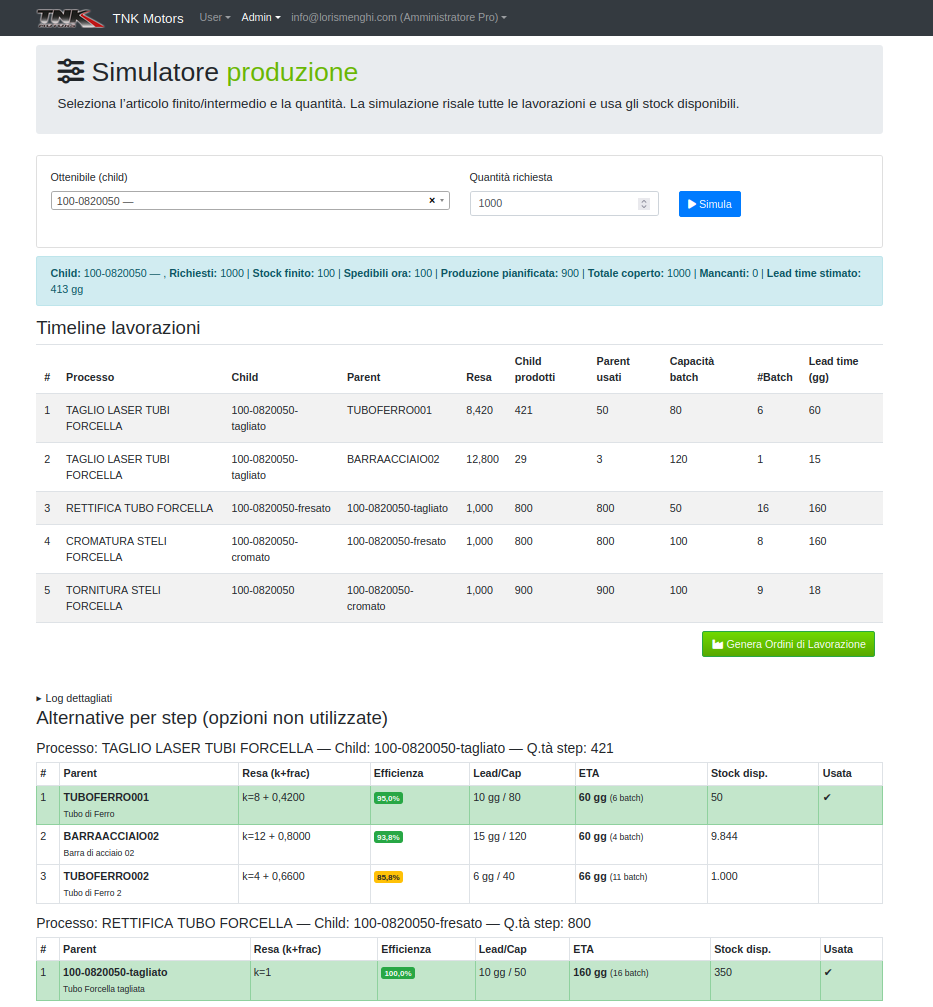
What-if planning with process timelines, parent choices, yield, lead time and batch capacity.
Production module guide
The production section was added alongside the existing warehouse, assembled-product and Magento synchronization functions. Its scope includes production planning, scrap optimization, delivery-time forecasting, external-supplier processing, job acceptance and support for deciding how much raw material should be kept in stock according to expected demand.
Operators maintain the available process types — for example cutting, milling or chrome plating — together with the default parameters used by planning and work-order creation.
A semi-finished-product association connects a Parent item to a Child item for a specific process. This lets the simulator evaluate alternative inputs and choose the most suitable path.
Draft work orders can be created from the Production simulator, directly from an order view or from the Combined analysis. The draft records the input and output products, process, dates and expected price when known.
A draft can be assigned to an external supplier and sent through a public tokenized link. The supplier does not receive the internal administration controls; the public workflow lets them confirm the proposed work or send back a revision.
Controlled lifecycle
Production does not move through free-form status changes. The application controls the lifecycle so supplier confirmation, internal acceptance, component allocation and physical processing remain distinct steps.
| Code | Status | Actor | Meaning | Available action |
|---|---|---|---|---|
| 10 | Draft | Admin | Work order created, not yet sent | Send · Edit · Delete |
| 20 | Sent | Supplier | Request sent to supplier | Supplier confirms or revises |
| 25 | Supplier revised | Admin | Supplier proposed changes | Review and re-send |
| 30 | Supplier confirmed | Admin | Quantity / price confirmed | Confirm internal acceptance |
| 40 | Admin accepted | Admin | Internal approval to proceed | Allocate components |
| 45 | Allocated | Admin | Inputs allocated and WIP created | Start · Rollback |
| 50 | In progress | Admin | Processing started | Complete |
| 60 | Completed | Admin | Output returned; scrap recorded | — |
| 70 | Cancelled | Admin | Work order closed without completion | — |
Controlled sequence after supplier confirmation: 30 → 40 → 45 → 50 → 60.
At status 40, Allocate components moves the work order to 45. Input material is reserved / committed according to the inventory model and a WIP record is created so the material being processed is represented separately from both free stock and completed output.
From In progress, the work order can be completed and the actual output quantity recorded. The documented fallback order for the quantity is actual → expected → supplier-confirmed, while completion also records the returned output and any scrap / variance information.
Operational details
Why this project matters
The interesting engineering problem is the connection between product structure, incoming ecommerce orders, component availability, alternative production paths, external suppliers, WIP and delivery forecasting. The software does not treat production as an isolated planning screen; it integrates it with the operational data already used by the business.